Since the launch of OneGeo Chat, our RAG chatbot dedicated to exploring geographic data, the solution has continued to evolve.
After several iterations on the RAG architecture, the interface, and the integration with OneGeo Suite, here is v2.2: a complete interface overhaul, new geographic search features, and administration tools built directly into the application. Here’s an overview of what’s changing!
If you’re not yet familiar with how OneGeo Chat works, we invite you to read our article “Your OneGeo Chat chatbot: a technical breakdown” before continuing.
ℹ️ Good to know: to access OneGeo Chat, you need a OneGeo Suite account and must be logged into it. You can try out the solution on our demo instance: demo.onegeosuite.fr.
The most visible change in this version is undoubtedly the complete interface overhaul. Until now, the frontend relied on a set of standard Vue 3 components with Vuex for state management. v2.2 moves away from this approach in favor of a new component library: AI Elements Vue.
🎨 A completely redesigned interface with AI Elements Vue
This change isn’t just cosmetic: it comes with a complete modernization of the frontend technology stack. Vuex and axios are gone, replaced by TailwindCSS v4, Reka UI, Motion V for animations, Shiki for code syntax highlighting, and tokenlens for managing and visualizing LLM tokens. These building blocks combine to deliver a much richer user experience.
Light and dark themes
The interface now supports a light theme and a dark theme, which can be switched at any time. A welcome detail when you spend hours querying your datasets! 🌙
Loading shimmer
While a response is being generated, a shimmer effect (a smooth loading animation) replaces the old progress indicator. The chatbot now lets you know it’s “thinking” in a much more elegant way than before.
Visualizing the model’s reasoning
Some recent models (such as “thinking” models based on Llama or DeepSeek) produce an internal chain of reasoning before formulating their final response. v2.2 exposes this reasoning trace directly in the interface: a dedicated panel displays the model’s thought process, making it easier to understand how it arrives at its conclusion.
💬 Richer conversations
Editing and regenerating messages
Asked a question that was too vague? No need to start a new conversation. v2.2 introduces three new actions on messages:
Regenerate: ask the model to rephrase its response based on the previous user message, without having to retype your question.
Copy: copy the text of a message in one click.
Edit: modify a user message. Editing cleanly truncates the conversation from that point onward, just as in typical conversational assistants.
Model selector
Users can now choose the language model directly from the interface, from the list of models available on the connected Ollama instance. No more hidden configuration in environment variables: the model can be switched live, conversation by conversation, or even message by message.
Enable or disable RAG on the fly
Until now, RAG (searching the document base) was always active. v2.2 adds a toggle button to enable or disable RAG for each exchange. Useful when you want to ask the LLM a general question without restricting it to the indexed documents.
🗺️ GeoFilter: a redesigned geographic search
GeoFilter is one of the most original features of OneGeo Chat: it automatically detects place names in the user’s question and filters search results by geographic extent (bounding box).
In the previous version, this filter relied on a location index stored in Qdrant (the solution’s vector database) and on a Django model. This required regularly harvesting and updating this index.
v2.2 radically simplifies this architecture: GeoFilter now uses real-time geocoding, querying in turn:
- the French government’s Geo API, ideal for French municipalities, departments, and regions;
- the National Address Database (BAN) for precise addresses;
- Nominatim / OpenStreetMap as a fallback for international or uncovered locations.
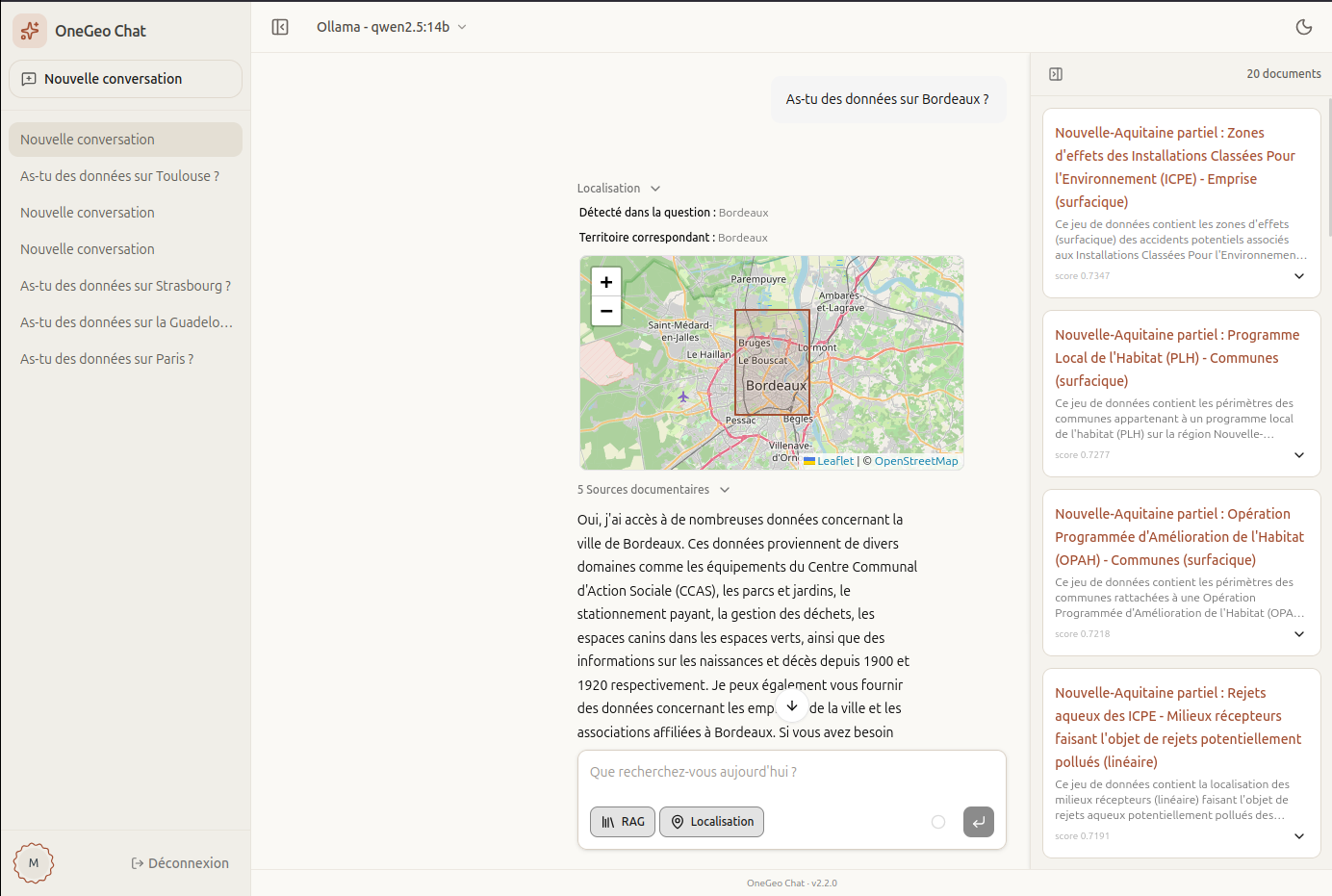
The result: no more Qdrant collection to maintain for locations, much broader geographic coverage, and better accuracy for French locations. The interface now displays the detected location and resolved geographic area as an interactive Leaflet map, directly within the conversation.
To enable or disable location-based search, a simple toggle button is available in the message composition bar.
📄 The retrieved documents column
v2.2 introduces a right-hand sidebar dedicated to retrieved documents. After each chatbot response, the most relevant documents found in the vector database are displayed there, along with their title, description, and similarity score.
Until now, these documents appeared at the bottom of the message, which could clutter the reading experience. Moving them to a dedicated side panel helps better separate the generated response from the source documents, while keeping them accessible at a glance.
By default, this document search is automatic after each response. For use cases that don’t require systematic searching, an environment variable allows switching to manual mode: a search icon then appears on each message, to be activated on demand.
📊 Token tracking and context indicator
With each exchange, an LLM can’t keep everything in memory: it has a context window of limited size, which includes the conversation history, the documents injected by RAG, and the current question. This volume is measured in tokens — small units of text that the model processes at once.
One of the challenges with LLM-based chatbots is knowing how much context remains available before reaching the model’s window limit. v2.2 addresses this issue in two ways:
- Per-message token count: each message displays the number of tokens consumed (input and output), calculated client-side using tokenlens.
- Conversation context indicator: a progress wheel shows the overall usage of the current conversation’s context window.
This information helps users (and administrators) better understand why a very long conversation can produce degraded responses — or why it’s sometimes useful to start a new conversation.
⚙️ An administration panel built into the application
Until now, advanced configuration of OneGeo Chat was handled exclusively through the Django admin interface, which wasn’t very user-friendly for everyday use. v2.2 introduces an administration panel directly within the application, accessible to administrator users.
This panel covers five main sections:
- General: global user settings.
- Limits: defining how many messages non-administrator users can send over a given period, the number of document sources injected into the context during a RAG exchange, and the number of suggested documents after each model response.
- Connections: adding and managing additional LLM providers (not just local Ollama).
- Models: selecting which models are available to all users.
- Usage: viewing token consumption by user and by model, over a configurable period.
Token usage is stored in an immutable log: even if messages are deleted or edited, the consumption history remains intact.
🌾 A redesigned harvesting process
Feeding the knowledge base from OneGeo Suite isn’t new: until now, it was the platform that pushed data to OneGeo Chat. Whenever a dataset was published or updated on OneGeo Suite, it was automatically sent to the chatbot’s database via the API.
v2.2 introduces a different approach: it’s now OneGeo Chat that queries the OneGeo Suite index to harvest the platform’s datasets — as well as content pages, articles, and harvested resources.
This shift from push to pull provides better abstraction from OneGeo Suite: the chatbot no longer needs to wait for an event on the platform side to trigger synchronization — it can refresh its knowledge base autonomously, on demand or according to a schedule set by the administrator.
🧩 An embeddable web widget
New in v2.2: the onegeo-chat web component. This is a lightweight version of the interface (without a conversation sidebar or administration panel) that can be embedded into any web page with just a few lines of HTML.
This widget uses the same Django sessions and CSRF mechanism as the main application, but can also authenticate via a JWT token for integrations in third-party environments. Ideal for enhancing an existing geographic data portal without deploying a full interface.
🛠️ Under the hood: technical changes
A few notable technical improvements round out this update:
- uv replaces Pipfile: the Python package manager is now uv, much faster than pip and offering reproducible dependency management.
- ASGI + uvicorn: the server moves from WSGI to ASGI (uvicorn), allowing multiple NDJSON (streaming) flows to be handled in parallel. Simultaneous conversations no longer block one another.
- Embedding batching: during harvesting, embedding requests to Ollama are now grouped by document rather than sent fragment by fragment. This significantly reduces indexing time.
- Load testing: a load testing suite has been added to the project to measure the performance of the entire pipeline (LLM + RAG + API).
In summary
v2.2 brings concrete improvements to the interface, geographic search, and administration. While it doesn’t claim to solve everything at once, it makes the tool more pleasant to use day to day, while staying true to its core goal: making it easier to explore datasets through conversation. A consolidation step that paves the way for future improvements.