ChatGPT is a conversational agent that can help you on a daily basis. However, you do not really know what OpenAI, its creator, does with your conversations. Moreover, it is not advisable to discuss confidential topics with it.
If you want to use it in your products, the API can quickly become very expensive (allow around 3 cents to process this article, for example, multiplied by the number of requests per user, multiplied by each user’s prompts…). Fortunately, the Open Source community is gradually providing alternatives.
The first step was Meta’s (Facebook’s) release of Llama. It is an almost free model, limited to 500 million users. Beyond that, you must contact them to obtain the right to use it. It is also possible to download it to your computers and use it strictly for private purposes.
To download the model, however, you must provide credentials by filling out a form and receive a link by email with a limited validity period. For experimentation, this can quickly become restrictive.
Technical democratization
The developers of llama.cpp (especially Georgi GERGANOV) optimized this engine, which allows you to chat with Llama2 models.
Llama2 models
Llama2 is available in several sizes (number of parameters): 7B, 13B, and 70B. The “B” unit corresponds to billions of parameters.
Given that each parameter is stored on 2 bytes (half-precision floats), you need at least 16 GB of RAM to load the small 7B model. Larger models are more relevant, but much slower.
Optimizations
The developers of llama.cpp worked on two optimizations:
- Being able to run computations (called “inference”) on the CPU while making the most of its capabilities (M1 optimization, AVX-512 or AVX2…) by coding the inference engine in C++ and likely some parts in assembly;
- Compressing the model without losing too much relevance.
For the latter point, they developed a 4-bit floating encoding: q4_0 (other variants with more bits exist). We can now use a 7B model with 4 GB of RAM! Note that you may still lose some relevance.
The work of llama.cpp is remarkable but difficult to use: the model may respond incorrectly or fail to return control after responding.
Ollama
Now, a successor exists: Ollama!
Considered the Docker of LLMs, it allows us to download, query, and delete models with a single command line. In terms of performance, Ollama is a Go wrapper that uses llama.cpp.
Installation instructions are available here: https://ollama.ai/download.
Once installed, you can download a model as simply as:
ollama pull llama2Once downloaded, you can query it as follows:
ollama run llama2

>>> comment faire une jointure entre 2 dataframes Pandas ?

There are several ways to join two pandas DataFrames. Here are a few methods:

1. `merge()`: This is the most common method for joining two DataFrames. It joins the two DataFrames based on a common column, called the "join key". The joined DataFrame will have the columns from both DataFrames.

```

df_left = pd.read_csv('left_data.csv')

...
Please note that Ollama also installs a Systemd service in the background. If you prefer to start it manually—for example, to control the available RAM on your machine—you must:
# désactiver le démarrage auto avec la machine

sudo systemctl disable ollama.service

# Couper réellement le service

sudo systemctl stop ollama.service
Which model?
Llama brought its share of breakthroughs, but other research teams have taken up the torch, notably Mistral AI, which managed to create small, highly efficient models.
Recently, Hugging Face (the equivalent of GitHub in the AI sphere) further improved Mistral by creating Zephyr, a small model that delivers very good results for multilingual conversation.
ollama run zephyr:7b

>>> comment faire une jointure entre 2 dataframes Pandas ?

Pour joindre deux DataFrames en Pandas, vous pouvez utiliser la méthode `merge()`. Ci-dessous une explication de comment utiliser cette méthode :

1. Assurez-vous que les deux DataFrames ont une colonne commune sur laquelle joindre les données. Soit df1 et df2, on appellera cette colonne 'common_column'.

...
Zephyr does not have a restriction clause limited to 500 million users (Apache 2.0 license), it responds in French, and it will be more resource-efficient.
Below is a list of a few models:
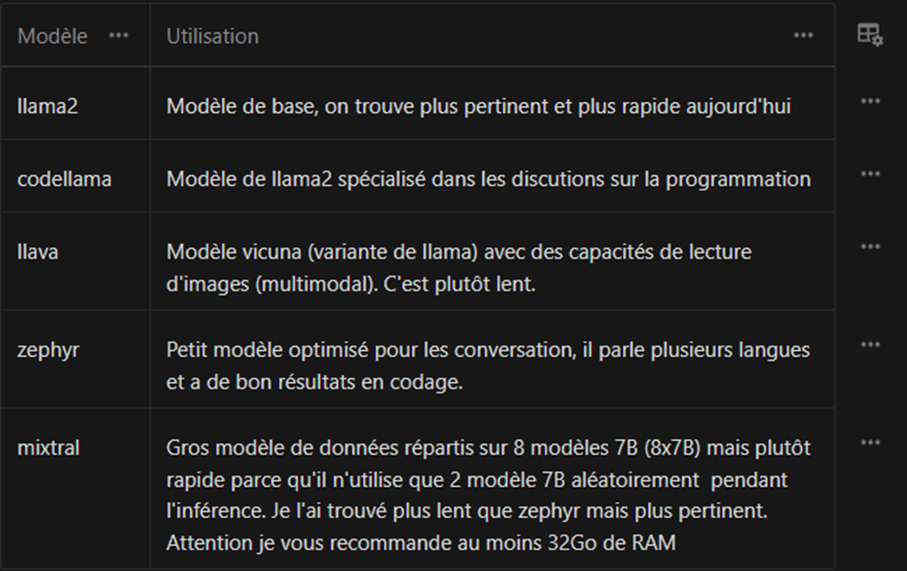
If it detects one, Ollama will automatically use the GPU. Otherwise, it falls back to the CPU while trying to take advantage of the available instructions (AVX2, AVX512, NEON for M1/M2…).
Docker
If you use the Ollama Docker image, remember to stop the Ollama service or change the TCP listening port in docker-compose.yaml.
Here is a minimalist docker-compose:
---

version: '3.8'

services:

  ollama:

    image: ollama/ollama:latest

    ports:

      - "11434:11434"

    volumes:

      - ollama:/root/.ollama

    restart: unless-stopped

volumes:
  ollama:
Then, a simple docker compose up -d to start the server.
How can we then run an inference?
$ docker compose exec ollama ollama run zephyr:7b

>>> Salut

Bonjour,

Je suis heureux d'aider quelqu'un aujourd'hui. Votre expression "Salut" est une forme courante de salutation en français. En France, c'est souvent utilisé entre amis ou entre personnes qui connaissent déjà l'un l'autre. Dans les situations où vous souhaitez être plus formel ou professionnel, vous pouvez utiliser "Bonjour" ou "Bonsoir" suivi du prénom de la personne ou simplement "Madame" ou "Monsieur" si vous ne connaissez pas le prénom.

J'espère que cela vous a été utile. Si vous avez d'autres questions, n'hésitez pas à me contacter.

Bien à vous,

[Votre nom]

>>>
However, using the image console is not practical, unless you want to download an image and never touch it again. Above all, we can use the HTTP API:
curl -X POST http://localhost:11435/api/generate -d '{ "model": "zephyr:7b", "prompt": "raconte moi une courte histoire drôle"}'

{"model":"zephyr:7b","created_at":"2024-01-11T15:27:47.516708062Z","response":"Il","done":false}

{"model":"zephyr:7b","created_at":"2024-01-11T15:27:47.534749456Z","response":" y","done":false}

...
To make inference easier to read, you can display the text token by token in our app. It can also be used in Python. Here is an example client included in the repository:
https://github.com/jmorganca/ollama/blob/main/api/client.py
It is still possible to use the previously installed ollama command-line client to query the server remotely:
OLLAMA_HOST=127.0.0.1:11435 ollama run zephyr:7b-beta-q6_K "raconte moi une courte histoire drôle"Docker and acceleration with an Nvidia graphics card
You will notice that inference in Docker is not very fast. Indeed, Docker does not allow the container to access the graphics card; therefore, inference runs on the CPU.
To do this, you must install a package provided by Nvidia to configure Docker properly:
curl -fsSL https://nvidia.github.io/libnvidia-container/gpgkey | sudo gpg --dearmor -o /usr/share/keyrings/nvidia-container-toolkit-keyring.gpg \

  && curl -s -L https://nvidia.github.io/libnvidia-container/stable/deb/nvidia-container-toolkit.list | \

    sed 's#deb https://#deb [signed-by=/usr/share/keyrings/nvidia-container-toolkit-keyring.gpg] https://#g' | \

    sudo tee /etc/apt/sources.list.d/nvidia-container-toolkit.list

apt update

apt install -y nvidia-container-toolkit
Once this package is installed, you must use the provided tool to configure Docker:
sudo nvidia-ctk runtime configure --runtime=dockerThis will modify your Docker configuration /etc/docker/daemon.json to enable an nvidia runtime:
{

        "runtimes": {

               "nvidia": {

                       "args": [],

                       "path": "nvidia-container-runtime"

               }

        }

}
Then, simply restart Docker:
systemctl restart dockerYou should now be able to access your Nvidia GPU from the container:
$ docker run --rm --runtime=nvidia --gpus all ubuntu nvidia-smi

Unable to find image 'ubuntu:latest' locally

latest: Pulling from library/ubuntu

a48641193673: Already exists

Digest: sha256:6042500cf4b44023ea1894effe7890666b0c5c7871ed83a97c36c76ae560bb9b

Status: Downloaded newer image for ubuntu:latest

Thu Jan 11 15:46:38 2024

+-----------------------------------------------------------------------------+

| NVIDIA-SMI 525.147.05   Driver Version: 525.147.05   CUDA Version: 12.0     |

|-------------------------------+----------------------+----------------------+

| GPU  Name        Persistence-M| Bus-Id        Disp.A | Volatile Uncorr. ECC |

| Fan  Temp  Perf  Pwr:Usage/Cap|         Memory-Usage | GPU-Util  Compute M. |

|                               |                      |               MIG M. |

|===============================+======================+======================|

|   0  NVIDIA GeForce ...  On   | 00000000:2D:00.0  On |                  N/A |

| 31%   33C    P5    32W / 225W |   1778MiB /  8192MiB |      2%      Default |

|                               |                      |                  N/A |

+-------------------------------+----------------------+----------------------+

+-----------------------------------------------------------------------------+

| Processes:                                                                  |

|  GPU   GI   CI        PID   Type   Process name                  GPU Memory |

|        ID   ID                                                   Usage      |

|=============================================================================|

+-----------------------------------------------------------------------------+
Once this is done, access must be granted to your container by modifying docker-compose.yaml:
---

version: '3.8'

services:

  ollama:

    image: ollama/ollama:latest

    ports:

      - "11435:11434"

    volumes:

      - ollama:/root/.ollama

    restart: unless-stopped

    deploy:

      resources:

        reservations:

          devices:

            - driver: nvidia

              capabilities: [gpu]

              count: all

volumes:

  ollama:
Thanks to docker compose up -d, our inference is now much faster.
Conclusion
We have discovered how to use free LLMs, with projects such as Ollama and Zephyr, which make AI more democratic and accessible to a greater number of people. No need to worry about the prohibitive costs of the OpenAI API when you can leverage these free, Open Source language models.
Whether you are a developer, a researcher, or an AI professional, Ollama offers exciting opportunities to innovate, create, and solve problems. The world of AI is now in your hands.
Sources:
https://www.unite.ai/fr/zephyr-7b-huggingfaces-llm-hyper-optimisé-construit-au-dessus-du-mistral-7b/
https://ollama.ai/blog/ollama-is-now-available-as-an-official-docker-image
https://github.com/jmorganca/ollama/blob/main/README.md#quickstart
https://docs.nvidia.com/datacenter/cloud-native/container-toolkit/latest/install-guide.html
https://docs.nvidia.com/datacenter/cloud-native/container-toolkit/latest/sample-workload.html
Author: Sébastien DA ROCHA