Chatbots are everywhere, but OneGeo Chat is not limited to generic answers: it leverages your datasets! Thanks to the RAG (Retrieval Augmented Generation) architecture, it queries and cross-references available information to provide accurate and contextualized answers tailored to your field.
🔍 This article is for those who want to go further and discover what happens behind the scenes: architecture, technological choices, infrastructure… We’re taking you backstage for the development of OneGeo Chat! 🚀
A chatbot, but not just any chatbot!
🧑💻 Behind the screen: the team at the helm
Behind OneGeo Chat, it’s us, the Innovation service team from Neogeo Toulouse, who are at the helm: Sébastien Da Rocha and Mathilde Pommier. Passionate about advances in natural language processing (NLP), we have drawn on the latest research to design a chatbot that is both high-performing and truly useful. Rather than developing a generic assistant, we wanted to create a tool capable of leveraging your datasets to provide accurate answers tailored to your business context.
🎯 Why OneGeo Chat?
The idea for OneGeo Chat was born from observing certain recurring challenges encountered by our users in how they search for datasets. We already have OneGeo Explorer, a powerful tool for full-text search. The latter has a limitation: if the user does not know the exact terms present in the datasets they are looking for, they might not find them. This observation revealed a need: for a more flexible search, adapted to users who do not always know how to formulate their query.
Another need we identified is the ability to query datasets on vast and complex topics. When users start searching for information, they don’t always have a clear idea of all aspects of the subject they are exploring. There is often a lack of dynamic interaction that would allow for deeper research as they go, asking specific questions and obtaining contextualized answers. That’s why we chose the chatbot format: to offer a fluid exchange, like a conversation, to guide the user in their search.
Finally, another important point is that users often perform similar searches or try to find information they have already consulted. The chatbot therefore makes it possible to keep track of searches by saving them in different conversations. This allows for faster classification and retrieval of relevant data, thus facilitating future exchanges.
It is in response to these needs that OneGeo Chat was born: a solution that not only allows for querying datasets in a more natural way, but also keeping track of searches and facilitating exploration even for the most complex subjects.
🔌 Seamless integration
From the design phase, OneGeo Chat was designed to integrate smoothly into the OneGeo Suite platform, in order to offer a unified experience to users. Just like OneGeo Explorer, the goal was to create a single entry point where users can manage, search, and visualize their datasets without having to juggle multiple tools. This integration allows for centralizing data access while optimizing the fluidity of the user experience.
However, we also took the need for flexibility into account. Thus, OneGeo Chat was designed to work as a stand-alone solution, completely autonomously, for users with more modest or specific needs. This modularity of the solution, both in terms of integration into a larger environment or independent deployment, allows OneGeo Chat to adapt to different configurations and meet a wide variety of use cases.
Behind the scenes of the code
This is where it gets serious! 🚀 We are now diving into the technical heart and the choices that shaped OneGeo Chat. Get ready to discover how this project was designed, the technologies used, and the infrastructure that allows this chatbot to run smoothly.
🏗 The project foundations
The RAG (Retrieval Augmented Generation) principle
At the heart of OneGeo Chat is a powerful architecture that combines two technologies: AI text generation and business information retrieval. This model, called RAG, allows our chatbot to go beyond simple response generation. Rather than relying solely on internal knowledge, it queries a vector database containing your datasets to look for relevant information, then generates a response based on that data.
The process takes place in two main stages: first, the harvesting (harvest) of different data sources to fill a vector database that will be used by the model during its use (inference). Then, the inference stage where the user asks the chatbot a question and the application responds using an AI model.
This second stage is itself divided into two, with first the phase of retrieving relevant data for the user’s question (the retrieval). Here, the chatbot consults the vector database previously filled in the harvest stage to retrieve documents related to the question asked.
Rather than searching for an exact match (full-text, as in OneGeo Explorer), the model is based on the vector proximity of terms. In other words, it evaluates the semantic similarity between the user’s question and the stored documents, which allows it to identify relevant answers even if the exact terms are not present in the datasets. This therefore involves vectorizing both the documents in the database and the user’s question with one and the same semantic model.
Once the relevant documents are retrieved, they form what is called a context that will feed an LLM (Large Language Model: generative AI model). In short, this context provides a basis for the AI and guides it in the right direction to generate an accurate response to the user’s question. Thus, the technique used is the same as the one you use when you detail your request in other chatbots.
This is how the RAG model concludes, allowing the AI model to generate responses based on the user’s datasets. A classic RAG ends here, but we will see later that ours includes an additional step. 🔍
The OneGeo Chat RAG
Now that the general principle of RAG is clear, let’s move on to the specifics of its implementation in OneGeo Chat. Our approach goes further than a simple classic Retrieval Augmented Generation by integrating advanced mechanisms to optimize the retrieval and use of information.
During the harvesting phase, our vector database is enriched with datasets from the OneGeo Suite platform. The latter pushes its published and harvested metadata into the OneGeo Chat vector database. Of course, only data accessible anonymously is available. The vector database can also (though it is not mandatory) be fed by pulling data from our project management application: Redmine. In the future, other data sources will be added, and you will also be able to add your own. Thus, these two mechanisms (push and pull) fill the OneGeo Chat vector database with your data.
More concretely, semantic search is only feasible and effective on small chunks of text of a few hundred characters. As a result, documents are not kept as they are in the OneGeo Chat vector database. They are therefore split into sentences before these are indexed using this vector representation. Of course, each sentence is recorded with a link to its original document so that we can trace back to the latter.
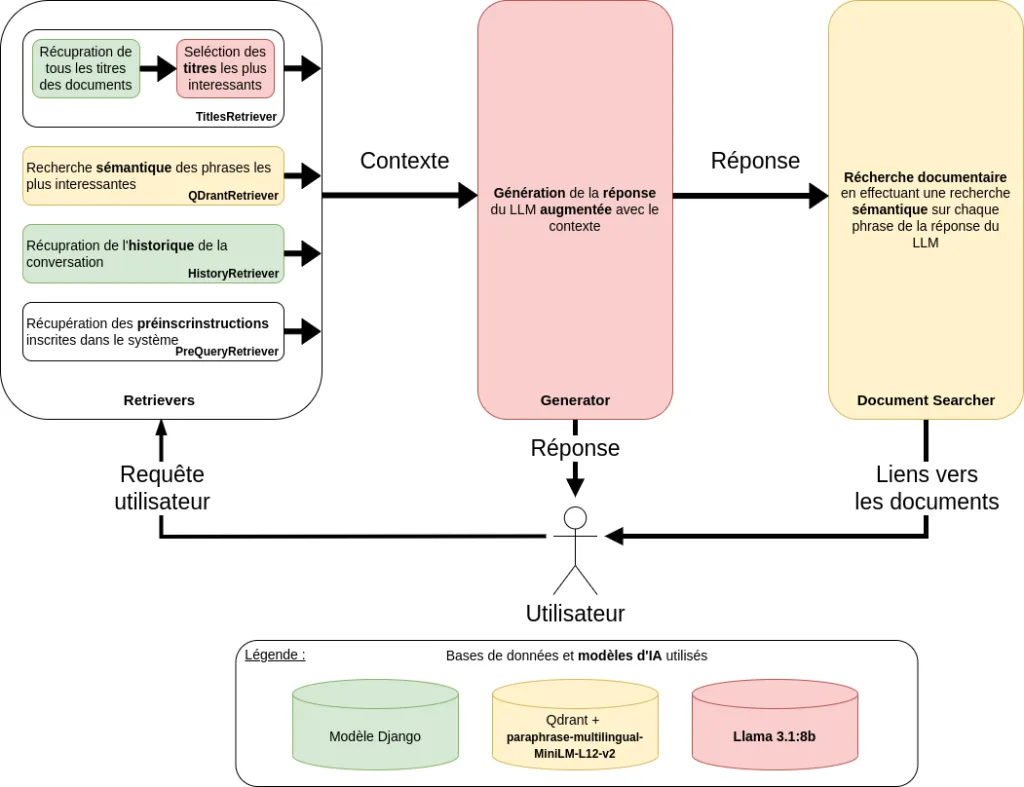
Furthermore, OneGeo Chat is not limited to retrieving the most relevant documents from a vector database; indeed, it adopts a more comprehensive and modular approach. We have implemented a chaining of retrievers, allowing for the aggregation of several types of information to form the context to be sent to the generative model:
- A hard-coded pre-instruction: even before searching for documents, the chatbot retrieves a set of directives defining its behavior (response language, citation of sources, etc.).
- Conversation history: to ensure real continuity in the exchange, the chatbot takes into account previous messages from the current conversation.
- The most relevant document titles: to refine the search, we use an initial filter based on the titles of the documents closest to the user’s query. This effectively guides the retrieval process.
- The most relevant documents in the vector database: once these steps are completed, the chatbot queries the vector database to retrieve the documents most in line with the question asked. We only retrieve data that is relevant from a semantic point of view: the title, description, and other metadata (but not dates, for example).
Thanks to this modular architecture, it is possible to add, orchestrate, or remove retrievers at any time, thus offering great flexibility for testing and selecting different retrieval and generation algorithms.
Finally, OneGeo Chat has one last peculiarity added to the classic RAG: an additional block called Document Searcher. This module intervenes once the response has been generated by the LLM and focuses on the document search use case. To do this, this module takes the initial question and the generated response as input. It performs semantic searches in the vector database on this input data. At the end of this process, the five most relevant documents are selected and presented to the user, accompanied by a link, a description, and its score.
Thus, the OneGeo Chat chatbot allows you to directly access the most relevant datasets related to your initial question.
You will find all the modules composing OneGeo Chat in the following diagram.
🛠 A clever mix of open-source technologies at the heart of OneGeo Chat
OneGeo Chat relies on several technologies that ensure its proper functioning, both on the artificial intelligence side and on the backend, frontend, and validation aspects.
For the AI part, two models are used: Llama 3.1:8b for the LLM generation of responses and paraphrase-multilingual-MiniLM-L12-v2 for semantic search. You have already seen these models in the previous diagram. We selected these models not only for their performance but also for their small size, which facilitates their execution (response time). Furthermore, they are available via Ollama, a solution that simplifies the management, use, and interchangeability of models.
The backend is developed in Python and with the Django framework. As for the vector database, we chose QDrant, which makes it easy to perform semantic searches. This vector database is also lightweight and easily deployable. To manage real-time communication, we use Django Channels, which allows for easy integration of WebSockets into Django. This technology allows us to easily manage conversations. Furthermore, Django REST Framework (DRF) facilitates interaction with the database and exchanges between the frontend and the backend.
On the frontend side, the interface is built with VueJS 3 and TypeScript. We opted for TypeScript rather than JavaScript to benefit from its typing rules, which helps limit bugs, improve code clarity, and facilitate long-term maintenance.
Also, at the Neogeo innovation service, we attach great importance to the quality and reliability of our developments. To guarantee robust code and maintain a high level of testing and validation, we have implemented a CI (Continuous Integration) in the GitLab of the OneGeo Chat project.
In particular, we use MyPy for static analysis of the Python backend code, which allows us to detect typing inconsistencies even before the program is executed. For code quality monitoring, SonarQube analyzes our code in depth to detect potential bugs and code smells, and to evaluate our code coverage. As for the tests themselves, Pytest is our main tool for executing unit and integration tests on the backend. On the frontend side, we have some Cypress tests, but these remain basic and are not integrated into the CI, though they can be executed manually.
Also, we have the Pip-audit tool which helps us identify security vulnerabilities in Python dependencies and ensure that our application relies on up-to-date and secure libraries. Finally, since OneGeo Chat is open-source, we use Pylic to verify that all the libraries and APIs we integrate comply with the appropriate licenses.
If you would like to learn more about license compatibility, I invite you to consult our article on the Affero GPL 3.0 license
Finally, deployment is managed via Docker, which not only allows for an isolated and reproducible environment, but also simplifies dependency management and ensures that OneGeo Chat works consistently, regardless of the environment. Also, Docker greatly simplifies the deployment and execution of dependencies. In summary, Docker makes the OneGeo Chat deployment process fast, reliable, and easy to maintain, which is why we adopted it.
🌍 An infrastructure that holds up
OneGeo Chat was designed to run on both GPU and CPU, offering flexibility depending on available resources. However, in practice, performance on GPU is significantly superior: generation times are much faster and the user experience is greatly improved.
The CPU mode remains an alternative, but it requires a significant amount of RAM and results in significantly longer response times. That is why we strongly recommend using a GPU to take full advantage of the application.
To facilitate adapting the deployment to your infrastructure, the docker-compose.yml file includes specific sections for GPUs. By default, the configuration uses the CPU for better compatibility, but you can enable GPU support by uncommenting the corresponding parts. This allows you to leverage your hardware’s capabilities while maintaining a single, easy-to-manage configuration. To use GPU mode, you will need an Nvidia GPU with at least 8GB of RAM and have the Nvidia Container Toolkit installed. We have not tested with an AMD GPU, although it is theoretically possible. Once again, using containers with Docker greatly simplifies the deployment of OneGeo Chat.
Furthermore, to test locally OneGeo Chat, follow the detailed instructions in the Run Locally section of the project’s README. You will find all the steps to configure and run the application locally.
A final word
In conclusion, if you are looking for a simple and fast way to search and exchange effectively around your data, geomatic or otherwise, then OneGeo Chat is for you. As this project is still evolving, we wish to bring improvements and new features to it.
In particular, we want to strengthen validation by adding more functional tests with Cypress and by integrating Ragas to evaluate the relevance of the model. Ragas is a library that provides tools to improve the evaluation of LLM applications.
The optimization of generated responses is also a priority in order to further improve the quality of the results. Furthermore, we aim to make OneGeo Chat a pilot for our OneGeo Suite platform.
Finally, we would like to go further in the interpretation of geomatic data by leveraging not only the titles and descriptions of the datasets, but also their attributes and geometry.
To stay informed about the evolution of OneGeo Chat, you can consult the official Neogeo website, ask your questions and exchange with the community on our forum, and follow our news on LinkedIn.
Author: Mathilde Pommier