To better understand the article on neural networks, this week we invite you to code a small neural network to gain a clearer understanding of what weights, feed forward, and other concepts introduced in the previous article are.
We will create a single-neuron neural network and attempt to make it predict data points located on a straight line. This exercise is trivial and can be solved without using AI, but let’s remain humble to start.
Project Setup
Let’s use Jupyter, which remains the tool of choice for testing and developing AI.
# On crée un environnement virtuelle python, et on l'active
python3 -m venv test_ia
cd test_ia
. bin/activate

# On installe jupyter et on le lance
pip install jupyter
jupyter notebook
This last command will open Jupyter in your browser.
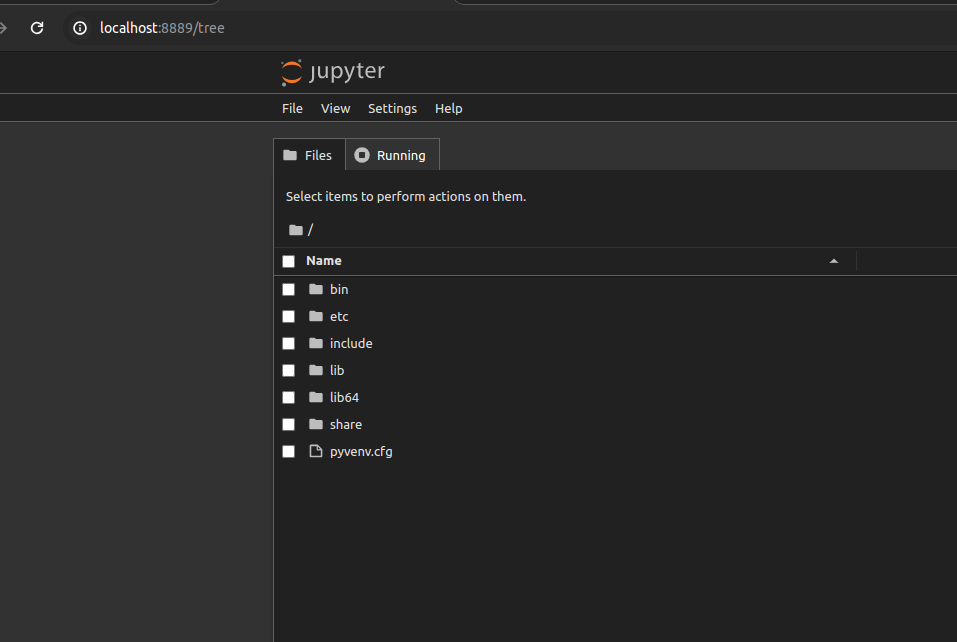
You can go to “File” -> “New” -> “Notebook” to create a new file and copy/test our program.
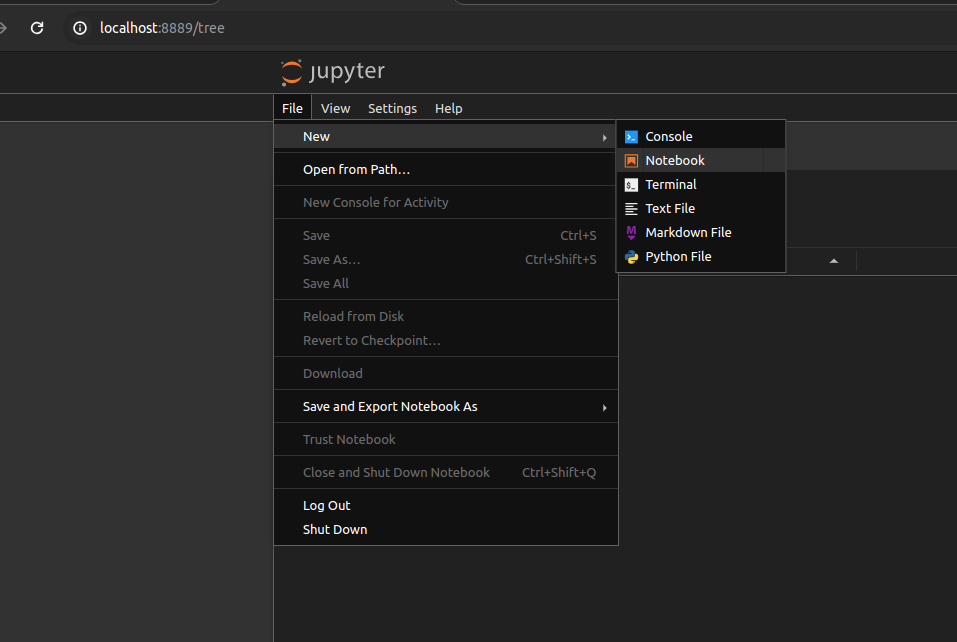
If the “Notebook” option is not available, replace “tree” with “lab” in your URL. The interface will then be slightly different, but you can create a new Notebook from “File” -> “New” -> “Notebook”.
What do we need?
Numpy is a Python library optimized for list management.
NB: There is an exclamation mark at the beginning of the line, which means the command will be run in the shell. Here, it will install dependencies in our virtual environment.
!pip install numpy
import numpy as np

Requirement already satisfied: numpy in /home/seba/.local/share/virtualenvs/blog-simple-neural-network-F0Tscko_/lib/python3.11/site-packages (1.26.4)Pandas, the star Python library for data science, itself based on Numpy.
!pip install pandas
import pandas as pd
Requirement already satisfied: pandas in /home/seba/.local/share/virtualenvs/blog-simple-neural-network-F0Tscko_/lib/python3.11/site-packages (2.2.2)
Requirement already satisfied: numpy>=1.23.2 in /home/seba/.local/share/virtualenvs/blog-simple-neural-network-F0Tscko_/lib/python3.11/site-packages (from pandas) (1.26.4)
Requirement already satisfied: python-dateutil>=2.8.2 in /home/seba/.local/share/virtualenvs/blog-simple-neural-network-F0Tscko_/lib/python3.11/site-packages (from pandas) (2.9.0.post0)
Requirement already satisfied: pytz>=2020.1 in /home/seba/.local/share/virtualenvs/blog-simple-neural-network-F0Tscko_/lib/python3.11/site-packages (from pandas) (2024.1)
Requirement already satisfied: tzdata>=2022.7 in /home/seba/.local/share/virtualenvs/blog-simple-neural-network-F0Tscko_/lib/python3.11/site-packages (from pandas) (2024.1)
Requirement already satisfied: six>=1.5 in /home/seba/.local/share/virtualenvs/blog-simple-neural-network-F0Tscko_/lib/python3.11/site-packages (from python-dateutil>=2.8.2->pandas) (1.16.0)
Pytorch, one of the main Python libraries for building neural networks. Here we are only installing the CPU version; the base version works with CUDA, Nvidia’s scientific computing library, but it takes up a lot of disk space, so let’s be frugal.
!pip3 install torch --index-url https://download.pytorch.org/whl/cpu
import torch
import torch.nn.functional as F
Looking in indexes: https://download.pytorch.org/whl/cpu
Collecting torch
  Downloading https://download.pytorch.org/whl/cpu/torch-2.3.1%2Bcpu-cp311-cp311-linux_x86_64.whl (190.4 MB)
[2K     [38;2;114;156;31m━━━━━━━━━━━━━━━━━━━━━━━━━━━━━━━━━━━━━━[0m [32m190.4/190.4 MB[0m [31m26.4 MB/s[0m eta [36m0:00:00[0mm eta [36m0:00:01[0m[36m0:00:01[0m
[?25hCollecting filelock
  Downloading https://download.pytorch.org/whl/filelock-3.13.1-py3-none-any.whl (11 kB)
Requirement already satisfied: typing-extensions>=4.8.0 in /home/seba/.local/share/virtualenvs/blog-simple-neural-network-F0Tscko_/lib/python3.11/site-packages (from torch) (4.12.2)
Collecting sympy
  Downloading https://download.pytorch.org/whl/sympy-1.12-py3-none-any.whl (5.7 MB)
[2K     [38;2;114;156;31m━━━━━━━━━━━━━━━━━━━━━━━━━━━━━━━━━━━━━━━━[0m [32m5.7/5.7 MB[0m [31m57.2 MB/s[0m eta [36m0:00:00[0m MB/s[0m eta [36m0:00:01[0m
[?25hCollecting networkx
  Downloading https://download.pytorch.org/whl/networkx-3.2.1-py3-none-any.whl (1.6 MB)
[2K     [38;2;114;156;31m━━━━━━━━━━━━━━━━━━━━━━━━━━━━━━━━━━━━━━━━[0m [32m1.6/1.6 MB[0m [31m58.6 MB/s[0m eta [36m0:00:00[0m
[?25hRequirement already satisfied: jinja2 in /home/seba/.local/share/virtualenvs/blog-simple-neural-network-F0Tscko_/lib/python3.11/site-packages (from torch) (3.1.4)
Collecting fsspec
  Downloading https://download.pytorch.org/whl/fsspec-2024.2.0-py3-none-any.whl (170 kB)
[2K     [38;2;114;156;31m━━━━━━━━━━━━━━━━━━━━━━━━━━━━━━━━━━━━━━[0m [32m170.9/170.9 kB[0m [31m18.5 MB/s[0m eta [36m0:00:00[0m
[?25hRequirement already satisfied: MarkupSafe>=2.0 in /home/seba/.local/share/virtualenvs/blog-simple-neural-network-F0Tscko_/lib/python3.11/site-packages (from jinja2->torch) (2.1.5)
Collecting mpmath>=0.19
  Downloading https://download.pytorch.org/whl/mpmath-1.3.0-py3-none-any.whl (536 kB)
[2K     [38;2;114;156;31m━━━━━━━━━━━━━━━━━━━━━━━━━━━━━━━━━━━━━━[0m [32m536.2/536.2 kB[0m [31m42.9 MB/s[0m eta [36m0:00:00[0m
[?25hInstalling collected packages: mpmath, sympy, networkx, fsspec, filelock, torch
Successfully installed filelock-3.13.1 fsspec-2024.2.0 mpmath-1.3.0 networkx-3.2.1 sympy-1.12 torch-2.3.1+cpu
Matplotlib, for creating nice graphs.
!pip install matplotlib
from matplotlib import pyplot as plt
%matplotlib inline
Collecting matplotlib
  Downloading matplotlib-3.9.0-cp311-cp311-manylinux_2_17_x86_64.manylinux2014_x86_64.whl (8.3 MB)
[2K     [38;2;114;156;31m━━━━━━━━━━━━━━━━━━━━━━━━━━━━━━━━━━━━━━━━[0m [32m8.3/8.3 MB[0m [31m44.0 MB/s[0m eta [36m0:00:00[0mm eta [36m0:00:01[0m0:01[0m:01[0m
[?25hCollecting contourpy>=1.0.1
  Using cached contourpy-1.2.1-cp311-cp311-manylinux_2_17_x86_64.manylinux2014_x86_64.whl (306 kB)
Collecting cycler>=0.10
  Using cached cycler-0.12.1-py3-none-any.whl (8.3 kB)
Collecting fonttools>=4.22.0
  Downloading fonttools-4.53.0-cp311-cp311-manylinux_2_17_x86_64.manylinux2014_x86_64.whl (4.9 MB)
[2K     [38;2;114;156;31m━━━━━━━━━━━━━━━━━━━━━━━━━━━━━━━━━━━━━━━━[0m [32m4.9/4.9 MB[0m [31m57.3 MB/s[0m eta [36m0:00:00[0m31m72.7 MB/s[0m eta [36m0:00:01[0m
[?25hCollecting kiwisolver>=1.3.1
  Using cached kiwisolver-1.4.5-cp311-cp311-manylinux_2_17_x86_64.manylinux2014_x86_64.whl (1.4 MB)
Requirement already satisfied: numpy>=1.23 in /home/seba/.local/share/virtualenvs/blog-simple-neural-network-F0Tscko_/lib/python3.11/site-packages (from matplotlib) (1.26.4)
Requirement already satisfied: packaging>=20.0 in /home/seba/.local/share/virtualenvs/blog-simple-neural-network-F0Tscko_/lib/python3.11/site-packages (from matplotlib) (24.1)
Collecting pillow>=8
  Using cached pillow-10.3.0-cp311-cp311-manylinux_2_28_x86_64.whl (4.5 MB)
Collecting pyparsing>=2.3.1
  Using cached pyparsing-3.1.2-py3-none-any.whl (103 kB)
Requirement already satisfied: python-dateutil>=2.7 in /home/seba/.local/share/virtualenvs/blog-simple-neural-network-F0Tscko_/lib/python3.11/site-packages (from matplotlib) (2.9.0.post0)
Requirement already satisfied: six>=1.5 in /home/seba/.local/share/virtualenvs/blog-simple-neural-network-F0Tscko_/lib/python3.11/site-packages (from python-dateutil>=2.7->matplotlib) (1.16.0)
Installing collected packages: pyparsing, pillow, kiwisolver, fonttools, cycler, contourpy, matplotlib
Successfully installed contourpy-1.2.1 cycler-0.12.1 fonttools-4.53.0 kiwisolver-1.4.5 matplotlib-3.9.0 pillow-10.3.0 pyparsing-3.1.2
from random import randint, seed
Creating a Simple Dataset
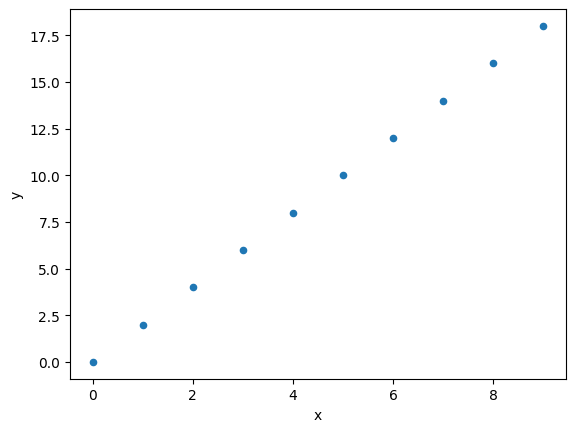
For demonstration purposes, we will create a perfectly linear dataset f(x) = 2*x.
We can easily verify that the network’s predictions lie on this line.
data = pd.DataFrame(columns=["x", "y"],
                    data=[(x, x*2) for x in range(10)],
                   )
data["x"] = data["x"].astype(float)
data["y"] = data["y"].astype(float)

data.plot.scatter(x="x", y="y")
<Axes: xlabel='x', ylabel='y'>
data
Getting Started
Let’s prepare some variables for the project. We also initialize model M; if you want to test code evolutions, rerun this cell to reset the model.
# On fait en sorte que pytorch tire toujours la même suite de nombres aléatoires
# Comme ça vous devriez avoir les mêmes résultats que moi.
torch.manual_seed(1337)
seed(1337)

# Je crée mon réseau d’un neurone avec une valeur aléatoire
M = torch.randn((1,1))

# On active le calcul du gradient dans le réseau
M.requires_grad = True
print(M)

# On garde une liste de pertes pour plus tard
losses = list()
tensor([[-2.0260]], requires_grad=True)
General Algorithm
For our network to learn from data, we need a feed forward phase and a back propagation phase.
What does that involve?
Let’s take an example from our dataset, the line x=9 and y=18.
# on prend un échantillon
ix = randint(0, len(data)-1)  # Indice de X

x = data.iloc[ix]["x"]
y = data.iloc[ix]["y"]
print(f"{x=},{y=}")
x=9.0,y=18.0
The feed forward phase consists of asking the model what data it predicts for x=9. We use the “@” operator, which multiplies tensors.
X = torch.tensor([x])
y_prevision = M @ X
---------------------------------------------------------------------------

RuntimeError                              Traceback (most recent call last)

Cell In[10], line 2
      1 X = torch.tensor([x])
----> 2 y_prevision = M @ X


RuntimeError: expected scalar type Float but found Double
Ah yes, Numpy internally converts our Float (32-bit) to Double (64-bit). Let’s convert our tensor to Float in this case.
X = torch.tensor([x]).float()
y_prevision = M @ X
print(f"{y_prevision=}")
y_prevision=tensor([-18.2339], grad_fn=<MvBackward0>)
Our model therefore predicts “-18.2339”, whereas our y value is 18.
This is normal since we initialized our model with completely random values.
We therefore need to correct our model, but first we will use a loss function, here l1_loss, to see how far off we are.
Y = torch.Tensor([y])
loss = F.l1_loss(y_prevision, Y)
print("loss", loss.item())
loss 36.23392868041992
We are off by 36 (i.e., 18 – (-18.23)), which is a lot.
To correct the model, we will perform the back propagation phase (or backward pass).
We will ask Pytorch to calculate the impact of the model’s weights on this decision. This is the gradient calculation. This operation, while not very complicated as it involves deriving all performed operations, deserves a separate article and will not be covered here.
# backward pass
M.grad = None
loss.backward()
Caution: you must always reset the gradient before starting back propagation.
Now that we have a gradient, we will update our model by applying a fraction of this tensor to it.
Why only a fraction? Here we have a very simple linear function to model. By applying the gradient, we would correct the model immediately. The problem is that, in real life, the situation is never that simple. In reality, data is heterogeneous, and therefore, applying the gradient to one data point improves the result for that point but would yield a very poor gradient for other data points.
We will therefore apply a fraction of the gradient and try to find the best compromise. This can be determined using the loss function.
We will therefore apply a modification of 0.1 times the gradient to our model; this 0.1 is called the learning rate.
# update
lr = 0.1
M.data += -lr * M.grad
print(f"{M.grad=}, {M.data=}")
M.grad=tensor([[-9.]]), M.data=tensor([[-1.1260]])
We will see how to choose the learning rate in another article.
Let’s see the result:
# forward pass
y_prevision = M @ X
print(f"{y_prevision=}")
y_prevision=tensor([-10.1339], grad_fn=<MvBackward0>)
Not bad, we went from -18 to -10. It’s still very poor, but we’ve only executed our feed forward / back propagation cycle once.
Let’s make sure to call our algorithm multiple times.
for i in range(1000):
    # on prend un échantillon
    ix = randint(0, len(data)-1)

    x = data.iloc[ix]["x"]
    y = data.iloc[ix]["y"]

    # forward pass
    y_prevision = M @ torch.tensor([x]).float()
    loss = F.l1_loss(y_prevision, torch.Tensor([y]))

    # backward pass
    M.grad = None
    loss.backward()

    # update
    lr = 0.01
    M.data += -lr * M.grad

    # stats
    losses.append(loss.item())
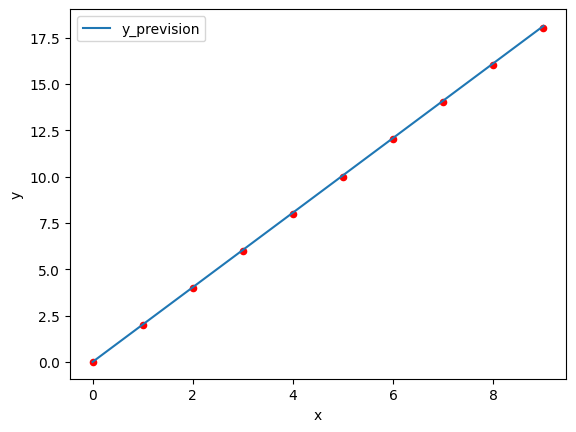
Let’s see what our prediction looks like on a graph. Data points in red, prediction curve in blue.
ax = data.plot.scatter(x="x", y="y", color="red")
prevision = pd.DataFrame(np.arange(10), columns=["x"])
m = M.detach()
prevision["y_prevision"] = prevision["x"].apply(lambda x: (m @ torch.tensor([float(x)]))[0].numpy()) #torch.tensor([4.])
prevision.plot(y="y_prevision", ax=ax, x="x")
<Axes: xlabel='x', ylabel='y'>
What if we go beyond the data range with an X of 2000?
m @ torch.tensor([float(2000)])
tensor([4028.0156])
Not bad, we should have 4000, but it’s already better.
And compared to our base data?
prevision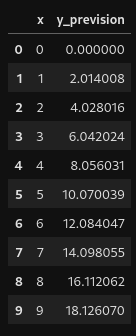
Okay, what’s happening? Let’s look at the evolution of our loss as a function of iterations.
pd.DataFrame(losses, columns=["loss"]).plot()
<Axes: >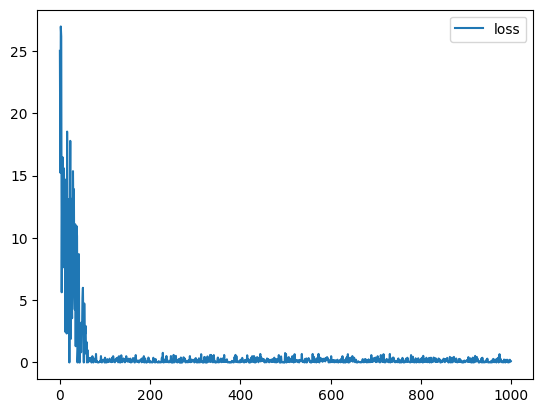
We see that the losses are significant for 100 iterations and then stabilize somewhat between 0 and 0.8.
Can we improve this? Yes, very easily; we will see this together in a future article.
Conclusion
We have learned how to create a model and perform training with the feed forward and back propagation phases. Then we saw that the learning rate and gradient allow us to correct the model little by little. By performing a few hundred iterations, we have a good regression model.
I hope this brief introduction has made you want to go further.
Author: Sébastien Da Rocha