What is a tile?
To display spatial data on a map, there are different data formats, including the vector tile, which brings new possibilities for displaying data (fast data access, easy style modification, direct user interaction with objects).
Indeed, a digital map can theoretically display data at any scale and in any location, but this flexibility can cause performance issues.
Tile mosaicking improves display speed and efficiency:
- By limiting the available scales. Each scale is twice as detailed as the previous one.
- By using a fixed grid. The areas we want to display are made up of collections of appropriate tiles.
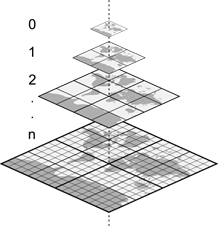
Most tile systems start with a single tile covering the entire world, called “zoom level 0,” and each subsequent zoom level increases the number of tiles by a factor of 4, doubling both vertically and horizontally.
Tile coordinates
Each tile in a mosaicked map is referenced by its zoom level, horizontal position, and vertical position. The commonly used addressing scheme is XYZ.
Here is an example at zoom level 2:
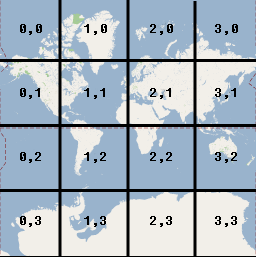
We will retrieve the tile using the following XYZ addressing:
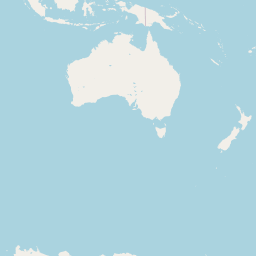
http://server/{z}/{x}/{y}.formatFor example, you can view the image tile of Australia at the following address; the same principle applies to vector tiles:https://tile.openstreetmap.org/2/3/2.png
How a vector tile works
Vector tiles look like raster tiles, but instead of an image, they contain data describing the elements that make them up using vector paths. Instead of sets of pixels, there are sets of point coordinates, to which several attribute pieces of information can be associated.
Like their raster cousins, vector tiles can be cached, both server-side and browser-side, allowing users to navigate huge maps quickly, even on lightweight devices.
How is it used?
Generating vector tiles on the fly from PostGIS
There are different building blocks for publishing data on the fly from PostGIS. Here is our selection:
- pg_tileserv => https://github.com/CrunchyData/pg_tileserv: a tile server coded in Go and produced by Crunchy Data. We prefer to use the dockerized version in our applications => https://hub.docker.com/r/pramsey/pg_tileserv
- Martin => https://github.com/maplibre/martin: very similar to pg_tileserv, coded in Rust and produced by MapLibre.
- GeoServer: also allows the generation of vector tiles
For the purposes of this blog, we will focus on using pg_tileserv.
pg_tileserv
By default, pg_tileserv allows you to generate vector tiles from the geographic tables in the database.
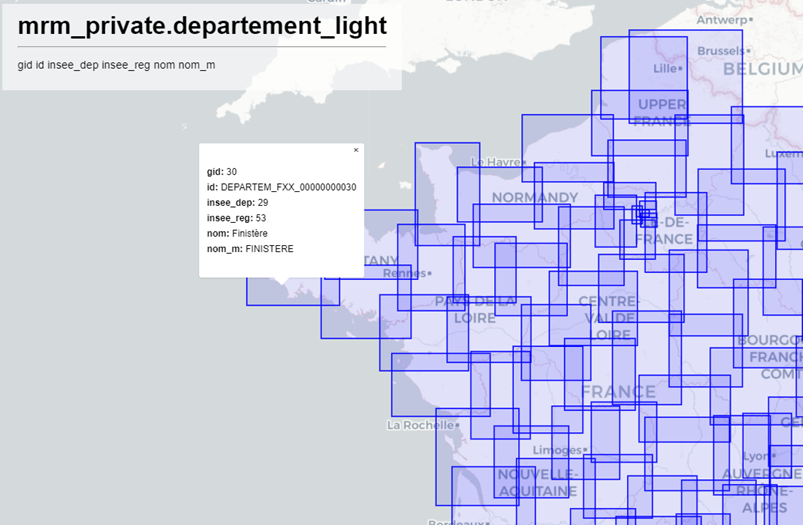
The real benefit of using a tool like pg_tileserv lies in generating tiles based on more refined analysis.
Here is an example of a query that can be used to display map data. This query will simplify the geometry based on the zoom threshold and filter the data based on the operator and technology.
CREATE OR REPLACE FUNCTION generate_couvertures_tiles(
  z integer,
  x integer,
  y integer,
  in_operateur bigint,
  in_techno character varying)
    RETURNS bytea
    LANGUAGE 'plpgsql'
    COST 100
    VOLATILE PARALLEL UNSAFE
AS $BODY$

#variable_conflict use_variable
begin
  return (
    WITH
    bounds AS (
      SELECT ST_TileEnvelope(z, x, y) AS geom,
     (CASE
      when z >= 12 then 0
      when z = 11 then 0
      when z = 10 then 10
      when z = 9 then 100
      when z = 8 then 300
      when z = 7 then 900
      when z = 6 then 1500
      when z <= 5 then 3000
      ELSE 1 END
       ) as simplify_tolerance
    ),

    mvtgeom AS (
      SELECT fid, operateur, date, techno, usage, niveau, dept, filename,
      ST_AsMVTGeom(
          ST_Simplify(t.geom,simplify_tolerance), bounds.geom) AS geom

      FROM couverture_theorique t, bounds
      WHERE ST_Intersects(t.geom, bounds.geom )
      and operateur = in_operateur
      and techno = in_techno
    )
    SELECT ST_AsMVT(mvtgeom)
    FROM mvtgeom
  );
end;
$BODY$;
To call this function, we will use a URL formatted as follows:
https://hostname/tileserv/public.generate_couvertures_tiles/{Z}/{X}/{Y}.pbf?in_operateur=28020&in_techno=3GNow you’re ready to let your imagination run wild to retrieve the data you want and meet the needs of your map.
We can think of creating clusters, thematic analysis, layer aggregation, or whatever else comes to mind.
What about performance?
All this newfound freedom will lead us into increasingly complex queries, and therefore degraded performance. If each tile takes 10 seconds to generate, the user experience will be poor.
To address this issue, let’s remember that the vector tile is based on a fixed grid. It is therefore possible to generate a cache (caching). Great! But how do we do that?
Here we go:
1 – Create a tile cache table
CREATE TABLE IF NOT EXISTS tiles_cache
(
    z integer NOT NULL,
    x integer NOT NULL,
    y integer NOT NULL,
    operateur bigint NOT NULL,
    techno character varying COLLATE pg_catalog."default" NOT NULL,
    mvt bytea NOT NULL,
    CONSTRAINT tiles_pkey PRIMARY KEY (z, x, y, operateur, techno)
)
2 – Generate the cache
To generate the cache, we first retrieve the grids on which we have data. The maximum zoom threshold (max_zoom) can be defined in the following function.
CREATE OR REPLACE FUNCTION gettilesintersectinglayer(
  liste_operateur bigint,
  liste_techno character varying)
    RETURNS TABLE(x integer, y integer, z integer)
    LANGUAGE 'plpgsql'
    COST 100
    VOLATILE PARALLEL UNSAFE
    ROWS 1000

AS $BODY$
DECLARE
  tile_bounds public.GEOMETRY;
  max_zoom INTEGER := 7;
BEGIN
  FOR current_zoom IN 1..max_zoom LOOP
    FOR _x IN 0..(2 ^ current_zoom - 1)
    LOOP
      FOR _y IN 0..(2 ^ current_zoom - 1)
      LOOP
        tile_bounds := ST_TileEnvelope(current_zoom, _x, _y);
        IF EXISTS (
          SELECT 1 FROM couverture_theorique
          WHERE ST_Intersects(geom, tile_bounds)
          AND operateur = liste_operateur
          AND techno = liste_techno
        )
        THEN
          RAISE NOTICE 'Traitement %', current_zoom || ', ' || _x || ', ' || _y;
          z := current_zoom;
          x := _x;
          y := _y;
          RETURN NEXT;
        END IF;
      END LOOP;
    END LOOP;
  END LOOP;
END;
$BODY$;
Using this grid table, we will generate all the tiles and insert them into the cache table.
with oper as (
  SELECT distinct operateur from couverture_theorique
),
techno as (
  SELECT distinct techno from couverture_theorique
)
insert into tiles_cache_couverture(z, x, y, operateur, techno, mvt)
select tile.z, tile.x, tile.y, oper.operateur,  techno.techno,
generate_couvertures_tiles(tile.z, tile.x, tile.y, oper.operateur, techno.techno)
from techno, oper, GetTilesIntersectingLayer(operateur, techno) as tile;
3 – Mixed cache/query rendering
Once the tiles have been inserted into the cache table, when we want to retrieve a tile, we need to route the lookup so that the function either retrieves the tile from the cache table or generates it on the fly.
CREATE FUNCTION couvertures(z integer, x integer, y integer, liste_operateur integer[], liste_techno character varying[]) RETURNS bytea
    LANGUAGE plpgsql
    AS $$

#variable_conflict use_variable
begin
  if (z <= 7 and array_length(liste_operateur,1) = 1) then
    return (
      SELECT mvt
      from tiles_cache_couverture
      Where tiles_cache_couverture.x=x
        AND tiles_cache_couverture.y=y
        AND tiles_cache_couverture.z=z
        and operateur = any(liste_operateur)
        and techno = any(liste_techno)
    );
  else
    return (
      WITH
      bounds AS (
        SELECTST_TileEnvelope(z, x, y) AS geom,
       (CASE
        when z >= 12 then 0
        when z = 11 then 0
        when z = 10 then 10
        when z = 9 then 100
        when z = 8 then 300
        when z = 7 then 900
        when z = 6 then 1500
        when z <= 5 then 3000
        ELSE 1 END
         ) as simplify_tolerance
      ),

      mvtgeom AS (
        SELECT fid, operateur, date, techno, usage, niveau, dept, filename,
        public.ST_AsMVTGeom(
           ST_Simplify(t.geom,simplify_tolerance), bounds.geom) AS geom

        FROM couverture_theorique t, bounds
        WHEREST_Intersects(t.geom, bounds.geom )
        and operateur = any(liste_operateur)
        and techno = any(liste_techno)
      )
      SELECTST_AsMVT(mvtgeom)
      FROM mvtgeom
    );
  end if;
end;
$$;
Now, by calling the “coverages” layer in pg_tileserv, at the smallest zoom levels (below 8), which are the most demanding in terms of computing geometric simplification, we will use the tile cache. However, when we get closer, we will use on-the-fly tile generation since performance is good.
For the more advanced users, here’s a little bonus: an example of a cluster layer generated on the database side. The cluster adapts to the zoom threshold, clustering at the departmental level, then the municipal level, then as a natural cluster (St_ClusterDBSCAN) with dynamic spacing for each zoom threshold, and finally displaying by individual object when very close. We could have imagined a honeycomb-style cluster, which I find more effective, since the issue with PostGIS clustering is that it is calculated within the extent of each tile. This means it splits clusters arbitrarily when there is high density between two tiles.
CREATE FUNCTION cluster_filtres(z integer, x integer, y integer, filtres text[]) RETURNS bytea
    LANGUAGE plpgsql
    AS $_$

#variable_conflict use_variable
DECLARE
  query text;
  result bytea;
begin
  --MISE EN PLACE DES FILTRES

  if ( z < 9) then
    --Vue par departement
    query := '
      WITH
      bounds AS (
        SELECT ST_TileEnvelope($1, $2, $3) AS geom
      ),
      item_fitler AS (
        --On récupère nos données filtrées
        SELECT distinct t.id
        FROM table t
        WHERE ' || filtres || '
      ),
      tot_dept AS (
        select code_departement, count(1) as tot_item
        from departement d
        INNER JOIN table t ON ST_Intersects(d.geom, t.geom )
        INNER JOIN item_fitler ON item_fitler.id = t.id
        group by code_departement
      ),
      mvtgeom AS (
        SELECT tot_dept.code_departement, tot_dept.tot_item,
        ST_AsMVTGeom(ST_PointOnSurface(tot_dept.geom), bounds.geom) AS geom
        FROM tot_dept
        INNER JOIN bounds ON ST_Intersects(tot_dept.geom, bounds.geom )
        WHERE tot_item is not null
      )
      SELECT ST_AsMVT(mvtgeom)
      FROM mvtgeom
    ';
    --RAISE NOTICE 'Calling query (%)', query;
    EXECUTE query INTO result USING z, x, y, filtres;
        return result;

  elsif ( z <= 10) then
    --Vue par commune, On ajoute un buffer pour récupérer les items autour de la tuile sans devoir le faire sur la France entière
    query := '
      WITH
      bounds AS (
        SELECT ST_TileEnvelope($1, $2, $3) AS geom
      ),
      item_fitler AS (
        --On récupère nos données filtrées
        SELECT distinct t.id
        FROM table t
        INNER JOIN bounds ON ST_Intersects(t.geom, ST_Buffer(bounds.geom, 10000) )
        WHERE ' || filtres || '
      ),
      tot_com AS (
        select insee_com, count(1) as tot_item
        from commune c
        INNER JOIN table t ON ST_Intersects(c.geom, t.geom )
        INNER JOIN item_fitler ON item_fitler.id = t.id
        group by insee_com
        having count(1) > 0
      ),
      mvtgeom AS (
        SELECT tot_com.insee_com, tot_com.tot_item,
        ST_AsMVTGeom(ST_PointOnSurface(tot_com.geom), bounds.geom) AS geom
        FROM tot_com
        INNER JOIN bounds ON ST_Intersects(tot_com.geom, bounds.geom )
        WHERE tot_item is not null
      )
      SELECT ST_AsMVT(mvtgeom)
      FROM mvtgeom
    ';
    --RAISE NOTICE 'Calling query (%)', query;
    EXECUTE query INTO result USING z, x, y, filtres;
        return result;

  elsif ( z <= 15) then
    --Vue par cluster
    query := '
      WITH
      bounds AS (
        SELECT ST_TileEnvelope($1, $2, $3) AS geom
      ),
      item_fitler AS (
        --On récupère nos données filtrées
        SELECT distinct t.id
        FROM table t
        INNER JOIN bounds ON ST_Intersects(t.geom, bounds.geom )
        WHERE ' || filtres || '
      ),
      clustered_points AS (
        SELECT ST_ClusterDBSCAN(t.geom, eps :=
          (CASE
            when $1 = 11 then 500
            when $1 = 12 then 385
            when $1 = 13 then 280
            when $1 = 14 then 150
            when $1 = 15 then 75
            ELSE 1 END
          ) , minpoints := 1) over() AS cid,
        t.fid, t.geom
        FROM table t
        INNER JOIN item_fitler s ON s.id = t.id
        group by t.id, t.geom
      ),
      mvtgeom AS (
        SELECT cid, array_agg(id) as ids,
        count(1) as tot_item,
        ST_AsMVTGeom(ST_PointOnSurface(ST_Collect(c.geom)), bounds.geom) AS geom
        FROM clustered_points c, bounds
        WHERE ST_Intersects(c.geom, bounds.geom )
        group by cid, bounds.geom
      )
      SELECT public.ST_AsMVT(mvtgeom)
      FROM mvtgeom
    ';
    RAISE NOTICE 'Calling query (%)', query;
    EXECUTE query INTO result USING z, x, y, filtres;
        return result;
  else
    --vue par objet
    query := '
      WITH
      bounds AS (
        SELECT ST_TileEnvelope($1, $2, $3) AS geom
      ),
      item_fitler AS (
        --On récupère nos données filtrées
        SELECT distinct t.id
        FROM table t
        INNER JOIN bounds ON ST_Intersects(t.geom, bounds.geom )
        WHERE ' || filtres || '
      ),
      mvtgeom as (
        SELECT ST_AsMVTGeom(t.geom, bounds.geom) AS geom, t.id
        FROM item_fitler t , bounds
        WHERE ST_Intersects(t.geom, bounds.geom )
      )
      SELECT ST_AsMVT(mvtgeom)
      FROM mvtgeom
    ';
    EXECUTE query INTO result USING z, x, y, filtres;
        return result;
  end if;
end;
$_$;
So, what are the benefits?
Basemap
When it comes to choosing basemaps, there are many advantages.
You can fairly easily customize a basemap by modifying the display settings you want to use for each element. To do this, you can rely on style files like those provided by Etalab: https://openmaptiles.geo.data.gouv.fr/.
If you host the style files yourself, you can modify them to choose the style of the elements. Here’s what the configuration of an element from a vector tile looks like:
    {
      "id": "landuse-commercial",
      "type": "fill",
      "source": "openmaptiles",
      "source-layer": "landuse",
      "filter": [
        "all",
        ["==", "$type", "Polygon"],
        ["==", "class", "commercial"]
      ],
      "layout": {
        "visibility": "visible"
      },
      "paint": {
        "fill-color": "hsla(0, 60%, 87%, 0.23)"
      }
    },
For example, it is possible to extrude buildings if you want a 3D rendering
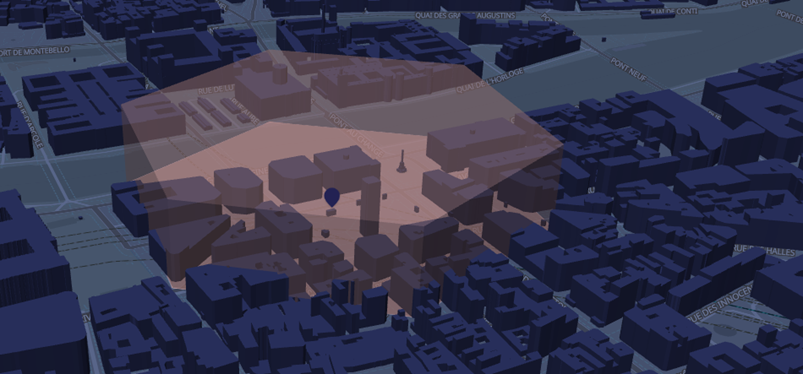
Vector display also allows labels/icons to always be displayed in the correct reading direction.
Choosing the layer display order
It’s also worth noting that it is possible to change the display order of layers from the basemap and business layers, which is not possible with WMTS-type basemaps. This allows municipality labels to stand out on top of a business layer.
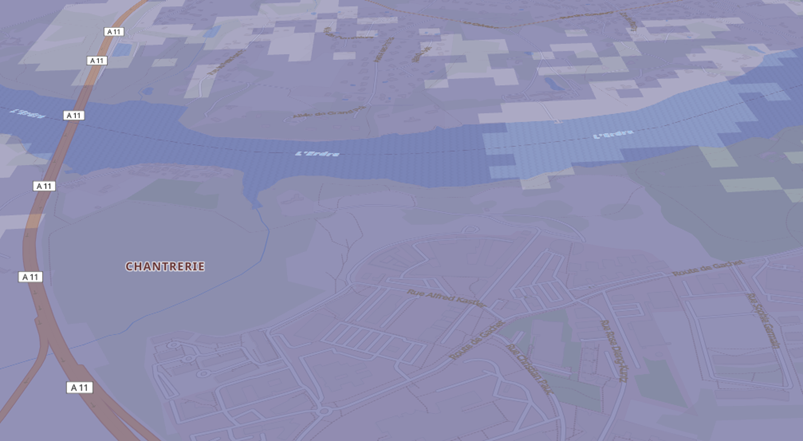
Vector layer
Since the layer is vector-based, it is also possible to retrieve its attributes.
Style editing tool
There are several tools available for modifying the style of vector data. However, I recommend Maputnik, which is very comprehensive and accessible => https://maplibre.org/maputnik/#0.77/0/0
Conclusion
In conclusion, vector tiles represent a significant advance in the dissemination and display of spatial data, enabling the creation of advanced mapping applications. However, they still need to be integrated into robust tools and high-performance methodologies in order to meet the growing need for precision and responsiveness. Vector tile technology is essential for the future of digital mapping, offering a balance between performance, flexibility, and interactivity.
Future directions?
Authentication and roles through pg_tileserv. In a future blog post, we could explore how to combine token-based authentication, the pg_tileserv service, and PostgreSQL security through Row Level Security. This would allow permissions to be managed at the object level, natively within PostgreSQL.
Author: Matthieu Etourneau